Blogging for Seniors A Step by Step Guide

How to Start a Blog Step by Step

Man taking Step by Step to Blogging

Blogging for Seniors: A Step by Step Guide

Blogging has become an increasingly popular way for people to share their thoughts, experiences, and knowledge. However, starting a blog can be daunting for seniors who may need to be more familiar with the technology. That's why a step-by-step guide to blogging for seniors can help break down the process into manageable steps.

First and foremost, seniors should choose a website platform to host their blog. Many options are available, such as WordPress, Blogger, and Wix, each with pros and cons. Once a platform is chosen, seniors can create their website by choosing a template, customizing the design, and adding pages and widgets.

Next, seniors should focus on creating quality content for their blogs. It can include writing about personal experiences, sharing advice, or discussing topics of interest. Seniors can attract readers and build a following by creating exciting and engaging content. Additionally, seniors can explore affiliate marketing or sponsored content options to profit from their blogs.

Step-by-Step Guide to Starting a Blog

Blogging can be an excellent way for seniors to share their experiences and knowledge. Here's a step-by-step guide to starting a blog.

Choose a Blogging Platform

The first step is to choose a blogging platform. Many options are available, but WordPress is the most popular and user-friendly platform. It's free to use, and thousands of themes and plugins are available to customize your blog.

Choose a Domain Name

Once you've chosen a platform, you must choose a domain name. It is the web address that people will use to find your blog. Choose a name that's easy to remember and relevant to your blog's content.

Select a Web Hosting Plan

After choosing a domain name, you'll need to select a web hosting plan. It is where your blog will be stored on the internet. Many web hosting companies exist, but Bluehost is famous for WordPress users.

Install WordPress

Once you've signed up for a web hosting plan, you must install WordPress. This simple process can be done with just a few clicks. Most web hosting companies offer a one-click installation process.

Select a Theme

After installing WordPress, you'll need to select a theme. It is the design of your blog. Thousands of free and paid themes are available, so take some time to find one that fits your style and content.

Customize Your Blog Design

Finally, you'll want to customize your blog design. It can include adding a logo, changing colors, and adding widgets to your sidebar. WordPress makes it easy to customize your blog design, so take some time to make it your own.

Starting a blog can seem overwhelming, but following these steps lets you be up and running quickly.

Identifying Your Blog Niche and Target Audience

Identify Your Blog Niche

The first step in creating a successful blog is to identify your niche. A niche is a specific topic or subject your blog will focus on. It's essential to choose a niche that you are passionate about, and that has a large enough audience to support your blog.

When selecting a niche, consider your interests, hobbies, and areas of expertise. It's also essential to research the competition to ensure that there is a demand for your niche.

Define Your Target Audience

Once you have identified your niche, the next step is to define your target audience. Your target audience is the group of people that your blog is intended for. Understanding your target audience is crucial for creating content that resonates with them and keeps them engaged.

Consider the demographics of your target audience, such as age, gender, location, and interests. This information will help you create content tailored to their needs and interests.

Research Your Competition

Researching your competition is essential to identifying your blog niche and target audience. It will help you understand what's already out there and what gaps you can fill with your blog.

Start by identifying the top blogs in your niche. Look at their content, writing style, and engagement with their audience. This information will help you create a unique voice for your blog and differentiate yourself from the competition.

In conclusion, identifying your blog niche and target audience is critical in creating a successful blog. By selecting a niche you are passionate about, defining your target audience, and researching your competition, you can create a blog that resonates with your readers and sets you apart.

Creating Quality Content for Your Blog

Writing quality content is essential for any successful blog. Here are some tips on how to create engaging content for your readers.

Brainstorming Blog Topics

Before you start writing, take some time to brainstorm potential topics for your blog. Consider your interests, areas of expertise, and what your readers might be interested in. You can also look at other blogs in your niche for inspiration.

Once you have a list of potential topics, narrow it down to those most relevant and exciting to your target audience.

Writing Engaging Blog Posts

When writing your blog posts, keeping your audience in mind is essential. Write in a friendly and conversational tone, and avoid using jargon or technical terms that your readers may not understand.

Use subheadings, bullet points, and images to break up your content and make it easier to read. Keep your paragraphs short and concise, and use active voice to make your writing more engaging.

Developing a Content Strategy

A content strategy can help you stay organized and ensure your blog consistently delivers high-quality content. Start by setting goals for your blog, such as how often you want to post and what topics you want to cover.

Create an editorial calendar to plan out your blog posts in advance. It will help you stay on track and ensure you always have fresh content for your readers.

Finally, be sure to review and edit your content before publishing. Check for spelling and grammar errors, and ensure your writing is clear and concise.

By following these tips, you can create quality content that engages your readers and helps your blog stand out in a crowded online space.

Promoting Your Blog and Building Your Audience

Once you've started your blog, it's time to promote it and build your audience. Here are some practical ways to do that.

Leveraging Social Media

Social media is a powerful tool for promoting your blog and connecting with potential readers. Platforms like Facebook, Twitter, and Instagram can help you reach a wider audience and drive traffic to your blog.

Create profiles with your target audience on the most popular platforms to make the most of social media. Share links to your blog posts, engage with your followers and use relevant hashtags to increase your visibility.

Networking with Other Bloggers

Networking with other bloggers can help you build relationships and gain exposure for your blog. Look for other bloggers in your niche and contact them via email or social media. Offer to collaborate on a project or guest post on each other's blogs.

Building a Community of Readers

Building a community of readers is essential for the long-term success of your blog. Encourage readers to leave comments and share your posts on social media. Respond to comments and engage with your readers to build a loyal following.

Promoting Your Blog through Email Marketing

Email marketing is a powerful way to promote your blog and engage your readers. Build an email list by offering a free resource or newsletter in exchange for readers' email addresses. Send regular newsletters with links to your latest blog posts and relevant content.

By leveraging social media, networking with other bloggers, building a community of readers, and promoting your blog through email marketing, you can build a loyal following and drive traffic to your blog.

Monetizing Your Blog

Exploring Different Revenue Streams

When monetizing your blog, there are several revenue streams to explore. Some of the most common ones include:

  • Advertising: Displaying ads on your blog is a popular revenue generation method. You can use services like Google AdSense, which pays you based on clicks or impressions.
  • Affiliate marketing involves promoting products or services on your blog and earning a commission for each sale through your unique affiliate link.
  • Sponsored content: Brands may pay you to write a post or review about their product or service on your blog.
  • Selling digital products: If you have expertise in a particular area, you can create and sell digital products like ebooks, courses, or webinars.

Identifying Affiliate Products to Promote

It would help to consider your niche and audience to identify affiliate products to promote on your blog. Choosing products that align with your blog's theme and that your readers will find valuable is essential. Some tips for finding affiliate products include:

  • Research affiliate networks like Amazon Associates, ShareASale, or Commission Junction.
  • You are looking for products or services that you use and love.
  • I was checking out what your competitors are promoting.

Advertising on Your Blog

Regarding advertising on your blog, there are a few things to remember. First, you must decide on the ads you want to display.

You can choose from display ads, native ads, or sponsored content. Second, you need to consider the placement of your ads.

It's essential to place them strategically where they will get the most visibility without being too intrusive.

Finally, it would help if you decided on the pricing model for your ads. You can charge a flat fee, a cost-per-click (CPC), or a cost-per-impression (CPM) fee.

In conclusion, monetizing your blog can be a great way to generate income while sharing your knowledge and passion with others.

You can start earning money from your blog by exploring different revenue streams, identifying affiliate products to promote, and advertising on your blog in no time.

Optimizing Your Blog for Search Engines

Understanding SEO

When it comes to blogging for seniors, optimizing your blog for search engines is crucial to ensure that your content gets found by your target audience. Search engine optimization (SEO) is optimizing your website or blog to rank higher in search engine results pages (SERPs) for specific keywords and phrases.

To understand SEO, it's essential to know how search engines work. Search engines like Google use complex algorithms to determine which web pages to show in their search results. These algorithms consider various factors, including the content on your website, the quality of your website's backlinks, and the user experience.

Optimizing Your Blog Posts for Search Engines

One of the most important things you can do to optimize your blog for search engines is to optimize your blog posts. Here are some tips for optimizing your blog posts for search engines:

  • Use relevant keywords: Use relevant keywords in your blog post titles, headings, and content. It will help search engines understand what your blog post is about and rank it accordingly.
  • Use descriptive meta tags: Meta tags are text snippets describing a page's content. Use descriptive meta tags that accurately describe the content of your blog post.
  • Use internal and external links: Use internal links to other relevant blog posts on your website and external links to authoritative sources supporting your content.
  • Use alt tags for images: Alt tags are descriptions of images that help search engines understand what the image is about. Use descriptive alt tags for all of the images in your blog post.
  • Use social media: Share your blog posts to increase their visibility and attract more traffic to your website.

By following these tips, you can optimize your blog for search engines and increase your chances of getting found by your target audience.

Maintaining Your Blog and Growing Your Online Presence

Maintaining a blog is an ongoing process that requires regular updates, interaction with readers, and continuous learning and improvement. Here are some tips for seniors to maintain their blogs and grow their online presence.

Regularly Updating Your Blog

Regularly updating your blog with fresh and engaging content is essential to keep your readers interested and attract new ones. Seniors can schedule a specific weekly time to write and publish new posts. They can also use a content calendar to plan their posts and ensure a consistent publishing schedule.

Interacting with Your Readers through Comments and Social Media

Interacting with readers through comments and social media is an excellent way to build a community around your blog and increase engagement. Seniors can respond to comments promptly and ask for feedback and suggestions from their readers. They can also use social media platforms like Facebook, Twitter, and Instagram to promote their blog and share their posts with a broader audience.

Continuously Learning and Improving Your Blog

Continuous learning and improvement are crucial to keeping your blog up-to-date and relevant. Seniors can attend online courses, webinars, and conferences to learn new skills and techniques for blogging. They can also use various tools and plugins to improve their blog's performance, such as SEO optimization, analytics, and security plugins.

In conclusion, maintaining a blog and growing your online presence requires commitment, dedication, and continuous learning. Seniors can use the above tips to keep their blogs fresh, engaging, and relevant to their readers. By following these guidelines, seniors can build a successful and thriving blog that reflects their expertise and written content.

Blogging for Seniors: Tips and Considerations

Blogging can be an enjoyable and rewarding activity for seniors. It allows them to share their experiences, thoughts, and ideas with others and connect with like-minded individuals. However, it can also be a stressful and overwhelming endeavor, especially for those new to the blogging world. Here are some tips and considerations to help seniors start blogging and avoid burnout.

Managing Stress and Avoiding Burnout

Blogging can be a time-consuming and demanding activity requiring much energy and creativity. Seniors should take steps to manage their stress and avoid burnout, such as:

  • Setting realistic goals and expectations
  • Taking breaks and resting when needed
  • Practicing relaxation techniques, such as deep breathing or meditation
  • Seeking support from friends and family

Sharing Your Personal Perspective

One of the benefits of blogging is the ability to share your perspective on various topics. Seniors can use their life experiences and wisdom to give their readers valuable insights and advice. They should:

  • Write in a conversational and engaging tone
  • Share personal stories and anecdotes
  • Be authentic and honest in your writing

Networking with Other Seniors

Blogging can also be a great way to connect with seniors with similar interests and passions. Seniors can:

  • Join online communities and forums for senior bloggers
  • Attend blogging conferences and events
  • Collaborate with other bloggers on guest posts or projects

Blogging as a Senior Caregiver

Seniors who are caregivers for their spouses or other family members can also benefit from blogging. It can provide a creative outlet and a way to share their experiences with others in similar situations. Seniors should:

  • Write about their caregiving experiences and challenges
  • Share tips and advice for other caregivers
  • Connect with other caregivers through blogging communities and support groups

Overall, blogging can be a fun and fulfilling activity for seniors. By following these tips and considerations, seniors can enjoy the benefits of blogging while avoiding stress and burnout.

Conclusion

Blogging can be a fulfilling and rewarding experience for seniors who want to share their stories and experiences. By following the step-by-step guide outlined in this article, beginners can learn how to create their blog and start publishing content online.

Seniors who are looking for a new career or job can also benefit from blogging as it can be a source of passive income and provide opportunities for networking and building industry expertise. Also, blogging can be a great way to stay connected with family and friends, especially for seniors living far away from their loved ones.

Many resources are available for seniors who want to learn more about blogging, including online tutorials, blogging communities, and industry experts who can offer advice and support. Seniors can also use their blogging skills to write about travel, beauty, education, and lifestyle and potentially become influencers in their respective niches.

Overall, blogging is an excellent way for seniors to share their knowledge and experiences with the world while providing opportunities for personal and professional growth. With the right resources and guidance, anyone can start their blog and begin their journey towards becoming a successful blogger.

Do something Great by Setting up your WordPress Blog Step by Step

Do Sometthing Great by Setting up your WordPress Blog Step by Step

Website from Start to Finish

Build A Website From Start to Finish

A Final goal from start to finish

Hockey player ending with A final goal from Start to finish

Website from Start to Finish: Did you know that a website is the core of everything you do online?

So you probably know this, but like most people, you may have questions on how to get a website up and running or perhaps what makes a website suitable.

I am here to tell you where you can find some reasonable pricing on getting a website up and running and what you can do to help get your site the traffic it needs to help you grow your business.

What You Need for a Good Website

While an experienced web developer may tell you that you need to use wireframes and other jargon you don't understand.

So remember that all you need to do is sit down and start planning the website.

Please look at some websites that are up and running, and note how they are made. What do you like about them? What do you not like about them?

Website from Start to Finish: These are some basic steps you can take to create your website, and as you check them out, write these things down so that you know what you need to do moving forward.

You will notice some things about all websites that are consistent with each other, so keep this in mind too.

Where to Go to Build a Website

Website from Start to Finish: Did you know that there are many places that you can go to get help with your website?

Many companies offer URLs for sale, but what about hosting?

These are important to know, and it's easier if you can find everything in the same place.

So, with that being said, I have an idea for you that I know well.

I use a WordPress site, and the beauty of WordPress is that you can blog from it, Host from it, embed video, and do all the same things you can do if you purchase a site from GoDaddy, Just Host, and many others.

So WordPress is an excellent tool because it's SEO friendly and ideal for business

Once you start creating your very own WordPress site, you will grow to love one-stop shopping with your site!

A Group Designing a website from start to finish

Working as a team building a Website from Start to Finish

Optimize Your Website

While having a website is good, there are some things you need to do regularly to ensure that it's getting the attention it needs to bring you business.

You must optimize your site with keywords, tags, images, and videos. You can use all this to get your website indexed much faster in Google, which will get you more visibility.

Fresh content is always a good thing, and while you won't want to change your entire website daily, this is easier if you have a blog site through WordPress.

These are all good things that you should be using to get more traffic to your website, and it's easy to do.

Website from Start to Finish: All you need to do is get started, and if you start driving traffic to your website each day, you will be able to grow your business more than you ever imagined.

I hope the information I've provided might serve as a good place for you to start when blogging.

If you enjoyed today's article, "Website From Start to Finish, please share the tools with others.

You can post on Forums and your Blog anywhere and everywhere with your email list.

You Might find these Beginner Blogging topics of Interest:

https://50plusblogging.com/check-blog-traffic-on-google-analytics/
https://50plusblogging.com/how-to-write-a-good-blog-disclaimer/
https://50plusblogging.com/web-hosting-company/

I also use Affiliate Products and links on my blog posts and pages to Build my Business.

One of the biggest questions in online marketing is how to monetize websites and blogs to make and embrace When to Start Blogging.

My Best to You,

Elizabeth Redd
elizabethredd179.s@gmail.com
Join my Facebook CommunityClick Here

************************************************************************************
You may lack willpower, but that doesn't mean you can't take many steps to make
Yourself more productive. - John Perry
************************************************************************************

P. S. I love to hear from you! Let me know what business you think about or are already involved with another company. What drew you to this article? How is the business going for you?
 
Visit my Facebook Page and tell me more About You. Click HERE! I would love to hear from you.

Get in touch with me on Twitter, or Please leave your questions and comments below. I would love to get your feedback!
Join my Facebook CommunityClick Here

SSL – Secure Sockets Layer Security

Secure Sockets Layer provides Security

SSL-Safe data when using Secure Sockets

The acronym "HTTPS" stands for "HyperText Transfer Protocol Secure,"

Secure Sockets Layer Security: What is SSL? It is short for Secure Sockets Layer and is the standard security technology for establishing an encrypted link between a web server and a browser.

Secure Sockets Layer Security: Websites that need an SSL connection will start with "HTTPS" instead of "HTTP." The acronym "HTTPS" stands for "HyperText Transfer Protocol Secure," which means that your data is safe to be transmitted if implemented correctly.

It means to get into the habit of looking for the "HTTPS" in the web address of whatever site you use if you plan on transferring private data through the site's server.

SSL Register for  Certificates

Sites using SSL will need to register for a digital certificate.

So. this digital certificate allows a website to transfer private data on the Internet by using critical public infrastructure, commonly referred to as merely PKI.

This digital certificate is also known as a public key certificate.

Secure Sockets Layer Security: It is worth taking a few extra minutes and researching the sites. A website with a good reputation will have great reviews and few instances of a security breach.

When we look at our browser, we see HTTP:// or HTTPS://. An example of this might be when we are ordering something online.

We will be giving out personal information and want to know that information is secure. No one will access our report on an HTTPS:// website.

It's worth a few extra minutes to check for secure socket layer security

check for secure socket layer security

Most of us 50-plus bloggers will be using WordPress as the way we build our website and as the template for our blog. Is WordPress secure?

Is HTTPS:// not seen in the browser when looking at the URL?

Suppose the website only publishes information in the form of articles, audio, graphics, and video—no need to worry about it being secure.

In case when collecting data from a visitor in the form of a name, email, credit card, and so on, the data is encrypted.

Otherwise, they will lead to potential security problems.

These are easy-to-install plugins to make a WordPress site become an SSL. Simple SSL is one of the best and most popular.

The largest search engine in the world is Google. They say this about having SSL.

"Over the past few months, we have been running tests considering whether sites use secure, encrypted connections as a signal in our search ranking algorithms. We have seen positive results, so we are starting to use HTTPS as a ranking signal."

If ranking is a goal, Google has spoken.

However, we do not have to worry about SSL most of us. If they sell things as an affiliate or even use a service such as PayPal, they will be on a secure site when customers leave the blog to purchase.

A free WordPress Secure Sockets Layer Certificate

Hosting companys will provide free SSL security certificates.

Free WordPress SSL Certificate

If you want a free WordPress SSL Certificate, here is what to do. The hosting company will provide a free SSL certificate.

  • Install the free SSL certificate from the hosting account.
  • Install and activate the Simple SSL plugin.

Go to www.fiverr.com and pay someone $5 to do this work!

Knowing a bit about SSL and how it works, you should better understand how to protect the site in the digital world.

Why the Internet is not always safe, but you should do what's best to protect information. Moreover, knowledge equals power when it comes to maintaining privacy.

Secure Sockets Layer Security: Knowing what to look for, it is up to you to ensure that the websites are reputable and trustworthy. The Internet creates victims daily, but do not be one of them.

Secure Sockets Layer Security: Always look for the "HTTPS" when purchasing or transferring private data. The power is in your hands, so keep an eye on the address bar in the web browser.

So, there you have it, "Secure Sockets Layer Security," to help your profit.

There are a few good tips and information, from having the right tools to having the right mindset for running your marketing endeavors.

These tips will have your marketing efforts paying off, and you will probably wonder why you did not take this on sooner.

I hope this information can be a useful starting point for your Blogging.

You Might find these Beginner Blogging topics of Interest:

https://50plusblogging.com/chrome-extensions/

https://50plusblogging.com/writing-impactful-emails/
https://50plusblogging.com/the-best-webinar-tools/

I also use Affiliate Products and links on my blog posts and pages to Build my Business.

One of the biggest questions in online marketing is how to monetize websites and blogs to make and embrace Online Blogging

I love to hear from you! Let me know what business you think about or are already involved with another company. What drew you to this article?

How is the business going for you?

If you want to learn what I do, "Join US Here"!

What the Heck! - Do It Now

My Best to You!
If you enjoyed today's post, please "Like & Share" this page if you want more content like this

Elizabeth Redd
Work with Me!

Join my Facebook Community: Click Here

***********************************************************************
Your goals are the road maps that guide you and show you what is possible in your life. - Les Brown
************************************************************************

PS: Join Our Team for more support and Training on helping you Build Your Business from Home. Ask Me How We Made Money online - If We Can Do It… So Can YOU!

This video will show you How:
– how simple it is to start Getting Instant $20 and $100 Monthly Commissions with this simple plan

keep getting that $100 over and over again

make sure you're selling something that others want to buy

– earn money online without having a "list" or any experience
– and much more… Click here to watch

DO NOT EVER LET ANYONE TELL YOU THAT YOU CAN NOT ACHIEVE YOUR DREAMS!

Click HERE! and Get all linked up…. so you can Earn...

Start Blogging with WordPress

Start your Blogging with WordPress

blogging with WordPress from a computer

Starting WordPress blogging for Beginners

Start Blogging with WordPress: Creating a website and connecting with people is the most effective and fastest way to grow your business. Regardless of your field, you need to know about WordPress. Look at five random websites, and four of them are powered by WordPress.

So, what do you think about creating a website for your business and services? Are you willing to start a WordPress blog? This article will answer all your queries.

How To Use WordPress for Your Blogging?

Start Blogging with WordPress: Before we start using WordPress, you must acquire knowledge of WordPress. WordPress is one of the simplest and most widely popular ways to create a website or a blog. Also, did you know you can create a website on WordPress for free?

WordPress.org or WordPress.com – Which one to choose?

However, people may confuse WordPress.org with WordPress.com. And if you thought the same, let us simplify things for you.

WordPress.org

Start Blogging with WordPress: WordPress.org lets you post websites and blogs through a third-party hosting provider. You must install separate WordPress software, buy a domain name, and manage the server yourself.

WordPress.com

But, WordPress.com will do all the work for you. There is no need to download any software to operate the website or blog.

Thus, it may appear not very clear when choosing the best site to start your website or blog.

If you feel confident that you can manage everything separately, such as buying and getting a domain name, uploading, and installing plugins, editing the website's code, and maintaining the security of your website, you can choose WordPress.org.

It seems free to start, but you must buy the rest.

However, a beginner's best option will be WordPress.com as an all-in-one option. The app will do everything, and the tools and applications are easy to use. So, anyone with no technical knowledge can start blogging here.

Once you get comfortable with the free versions, you can get the paid version, where you can get your WordPress subdomain name. And third-party sites are always there for custom domains.

If you like to know more about the steps for starting a WordPress Blog, watch this video below! 

What are the Self-Hosting WordPress Options?

For starters, WordPress.com is fine. You get to experience the achievement of building a website for the first time. However, with time, things start to get complicated.

Thus, your website may need to terminate the comfort of the fully hosted services of WordPress.com.

But then again, trying self-hosted WordPress blog options by WordPress.org will be the best. Self-hosted WordPress hosting depends on the software of WordPress.org.

And the best hosts offer up-to-date security measures and infrastructure to run and protect the content management system. Well, it may seem a bit troublesome to hear for the first time, but don't worry, as we will explain them all.

A successful website depends on speed, security, reliability, and affordability. Moreover, as you opt for self-hosting, you may want to explore a self-host with detailed technical support that blends with your WordPress website.

Nowadays, most major hosting providers offer a free customized domain email account or a professional email account for your business as user@yourdomain.com.

You can email UWL at courses@uwl.ac.uk or send an inquiry to St. Stephens College at enquiries@ssho.ox.ac.uk; both appear professional, look authentic, and make the brand stand out from any other Gmail, Yahoo, or Outlook email ids.   

So, let us look at some of the best self-hosted WordPress Hosting providers on whom you can blindly rely–

WPX-Hosting at wpx.net

WPX Hosting promises to provide the world's fastest managed WordPress hosting service so that you can enjoy the benefit of a fast-loading website. It offers a daily backup of the hosted website on its server and allows you to restore the website with a few clicks.

 It offers a free WordPress migration system, free email with a domain name, and a simple hosting dashboard.

The most helpful thing for a business owner is to get 24/7/365 support, and that is what WPX-Hosting offers through live text chat, phone calls, and email.

It is always active in resolving any issue and providing an immediate solution. People keep themselves on their toes to resolve any issue.

Bluehost  at https://www.bluehost.com/

Bluehost offers an exclusive WordPress Hosting service from 50GB storage to unlimited options.

WordPress has recommended it since 2005, and this hosting provider comes with free domain registration, email, SSD storage, SSL certificate, Free Office 365, and free automated backup for getting the best option available. The server also provides automatic

WordPress installation and updates, and thus make it easier for the clients to operate the hosting service pretty quickly.  

SiteGround at https://www.siteground.co.uk/

The free migration plugin, SiteGround.com, endorsed by WordPress.org, can be installed automatically. Also, if you aim for a secured website, it will provide 24x7 support through a chat system.

A2Hosting at https://www.a2hosting.com/

A2Hosting.com offers free HackScan and KernelCare, SSL certificates, 24X7 support, and A2 optimized plugins for the utmost security. Also, the speed and turbo server is added as a bonus with this hosting.

InMotionHosting at https://www.inmotionhosting.com/

If speed is your main requirement, you can opt for InMotionHosting.com. This self-hosted website comes with a free SSL certificate and SSD storage, with 12 times faster hosting than WordPress.

Furthermore, the hosting has an automatic WordPress plugin, core updates, and theme. Apart from that, this self-hosting features a free drag-and-drop WordPress page editor with premium themes and plugin subscriptions.

Cloudways.com at https://www.cloudways.com/  

If you have more than one or two websites on WordPress, you can use the Cloudways.com plugin to migrate the websites.

You will also get free CDN and WordPress staging areas, a pre-installed caching plugin, and Breeze. Also, the SSD storage is three times faster than WordPress hosting.

setting up a web service for beginners

A man working on a computer start using WordPress 

Another step-by-step guide to setting up a WordPress  theme for beginners

Installing WordPress with the Web Hosting Service

If you are installing WordPress with the web hosting services, you need to install the CMS to connect the new domain with your website. You can use different hosting providers according to your wishes.

GoDaddy.com is one of the most popular hosting providers. You can also use managed WordPress hosting services like WP Engine, Kinsta, etc. Here, you don't have to put in extra effort, as these sites are specially designed for WordPress.

So, let us go back to the GoDaddy account to complete the installation process. There you must click on the web hosting. After that, you must manage the account as you usually would, which you can see on a screen showing all the details.

You must go to the bottom to access the options and settings. In that section, you will see a title called "Popular Apps." There, click on the WordPress app and start the installation procedure.

Once you install WordPress, you need to answer a few questions regarding the domain you want to use and where you want to install WordPress with admin information.

And in the next 24 hours, a WordPress account will be installed on your hosting account. You will get an email confirmation from GoDaddy.

And you have completed the installation process of WordPress. Now there is so much work to be done on the website. However, those are easy to handle as the WordPress team will guide you thoroughly.

Using WordPress to Login

WordPress is a free-to-use blogging platform

WordPress login sign

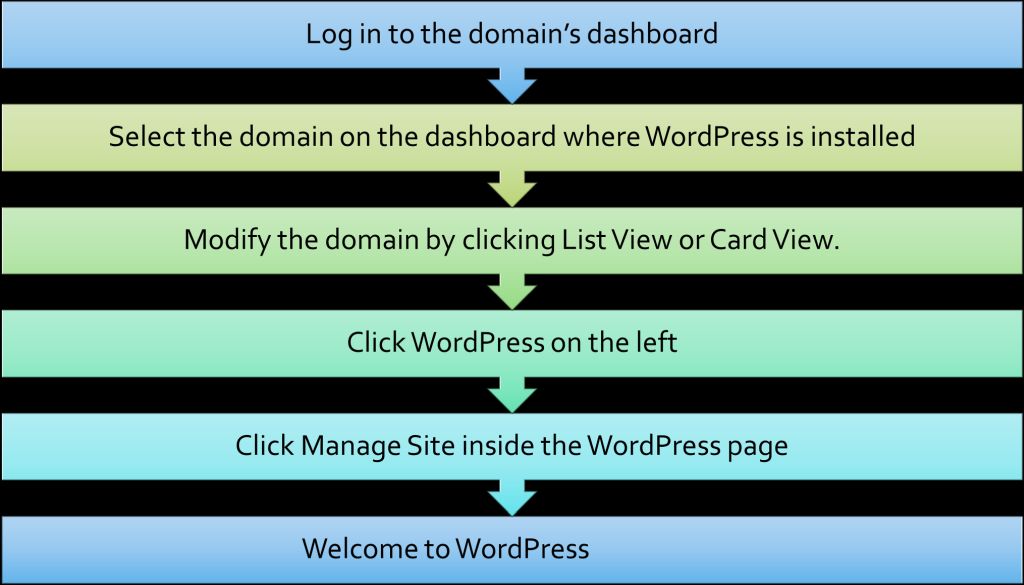
Now you need to log into WordPress through the dashboard. And the process is an effortless job. But, how to do that? Let us share the steps. You can access it in two ways.

  • Access the WordPress Dashboard through the Domains Dashboard.
  • Use a direct link to access WordPress. Access the WordPress Dashboard through Domains Dashboard

The following steps show how to access WordPress via Domain's Dashboard

step showing how to access WordPress

WordPress via Domain's Dashboard

Access the WordPress through a direct link

From the browser's address bar, search for your domain name with /wp-admin or /wp-login.php at the end.

  • Type in your WordPress username or email address and
  • You are on the WordPress dashboard.

Now that you have entered the dashboard, you are ready to use the site for your Blogging. So, continue posting and modifying your WordPress website as you see fit.

It's time to have the WordPress Blog of your Dream. Suppose you are in the Market to Learn. Click HERE If you prefer to start your blog in a few minutes.

So, there you have it, "Start Blogging with WordPress," to help your profit. There are a few good tips and information, from having the right tools to having the right mindset for running your marketing endeavors.

These tips will have your marketing efforts paying off, and you will probably wonder why you did not take this on sooner.

I hope this information can be a useful starting point for your Blogging.

You Might find these Beginner Blogging topics of Interest: 

https://50plusblogging.com/chrome-extensions/

https://50plusblogging.com/writing-impactful-emails/
https://50plusblogging.com/benefits-of-blogs/

I also use Affiliate Products and links on my blog posts and pages to Build my Business.

One of the biggest questions in online marketing is how to monetize websites and blogs to make and embrace Online Blogging.

I love to hear from you! Let me know what business you think about or are already involved with another company. What drew you to this article?

How is the business going for you?

If you want to learn what I do, "Join US Here"!

What the Heck! - Do It Now

My Best to You!
If you enjoyed today's post, please "Like & Share" this page if you want more content like this
Elizabeth Redd
Work with Me!

Join my Facebook CommunityClick Here

*********************************************************************************
Your goals are the road maps that guide you and show you what is possible in your life. - Les Brown
************************************************************************************

PS: Join Our Team for more support and Training on helping you Build Your Business from Home. Ask Me How We Made Money online - If We Can Do It… So Can YOU!

This video will show you How:

– how simple it is to start Getting  Instant $20 and $100 Monthly Commissions with this simple plan
– keep getting that $100 over and over again
– make sure you're selling something that others want to buy
– earn money online without having a "list" or any experience
– and much more… Click here to watch

DO NOT EVER LET ANYONE TELL YOU THAT YOU CAN NOT ACHIEVE YOUR DREAMS!

Click HERE! and Get all linked up…. so you can Earn...

Timezone Setup for WordPress

WordPress plug-ins can help you improve the functionality of your WordPress site.

Using the Correct Timezone 

WordPress on Tablet

Setting the timezone correctly

Timezone forWordPress is one of the most popular CMS(Content Management Systems) worldwide. You can find sites of top brands on WordPress. It is especially ideal for beginner bloggers due to its unique features and functionalities.

Nevertheless, many bloggers tend to make the mistake of not setting the time or date correctly.

It is crucial to set the correct Timezone for WordPress to post your articles as per the schedule. And there is no rocket science that you need to apply to adjust the date. Here is a step-by-step guide for timezone setup in WordPress.

Step-by-step Process for Setting Time in WordPress

WordPress allows you to update any timezone that you want. However, it is best to set the Timezone for WordPress that matches your mobile or laptop settings. Here is how you can do it.

  • Step 1 - Open your WordPress account and select the option of General
  • Step 2 - Find the section for the Timezone for WordPress
  • Step 3 - Choose the city that is close to you and has the same Timezone (It is preferable to choose a city that is available instead of selecting the UTC options since it will change with the Daylight Savings Time)
  • Step 4 - In case there is no city close to you, then you can add your Timezone by calculating it manually
  • Step 5 - Click on the save option to keep the changes

If you choose to set the UTC timezone manually, you need to keep it in mind because it does not take daylight Savings Time (DST) changes into account.

Therefore, you will have to do it yourself when the DST changes occur. It is best to choose a city in the same Timezone as yours as WordPress can update the time for DST.

Is There any WordPress Plug-ins for Time Setup

WordPress Plug-ins

Plug-ins for Timezone

WordPress allows you to build many more sites apart from blogs. The best part about WordPress is that they have amazing plug-ins that you can use. These plug-ins can help you in improving the functionality of your WordPress site.

So, if you are wondering if there is any plug-in for setting time in WordPress, then yes. WordPress has more than 55,000 plug-ins available on its site. These plug-ins allow users to convert the Timezone. Here are the top ones that you can find on the WordPress website:

 These plug-ins also have the option to display you the current Timezone. They can automatically calculate and update the Timezone for WordPress following the Daylight Savings Time. 

Final Word

Person Writing a Blog

Person writing a Blog

We now conclude the article and hope you understand the easy process for changing the Timezone for your blog. For any blogger, it is imperative to have the correct time on their WordPress. It will ensure your post gets published on time to engage your audience, and in addition, your Timezone for WordPress blogs need to have a catchy title.

So, there you have it, "Timezone Setup for WordPress," to help with your Blogging. There are a few good tips and information, from having the right tools to having the right mindset for running your marketing endeavors.

These tips will have your marketing efforts paying off, and you will probably be wondering why you did not take this on sooner.

I hope this information can be a useful starting point for you in your Blogging.

You Might find these Beginner Blogging topics of Interest:

https://50plusblogging.com/reasons-you-need-an-email-list/

https://50plusblogging.com/auto-responder-providers-compared/

https://50plusblogging.com/how-to-create-compelling-content/ https://50plusblogging.com/things-to-know-before-you-start-a-blog/

https://50plusblogging.com/common-blogging-mistakes-made-by-most-new-bloggers/

I also use Affiliate Products and links on my blog posts and pages to Build my Business.

One of the biggest questions in online marketing is how to monetize websites and blogs to make and embrace Online Blogging.

I love to hear from you! Let me know what business you are thinking about getting into or are already involved with another company. What drew you to this article? How is the business going for you?

Visit my Facebook Page and tell me more About You. Click HERE!

To Your Success

Elizabeth
elizabethredd179.s@gmail.com

https://50plusblogging.com

>